Bogue 
bogue is a GUI library for ocaml, with animations, based on SDL2.
This library can be used for games or for adding GUI elements to any ocaml program.
It uses the SDL2 renderer library, which makes it quite fast.
It is themable, and does not try to look like your desktop. Instead, it will look the same on every platform.
Graphics output is scalable, and hence easily adapts to Hi-DPI displays.
Programming with bogue is easy if you're used to GUIs with widgets, layouts, callbacks, and of course it has a functional flavor. It uses Threads when non-blocking reactions are needed.
Features
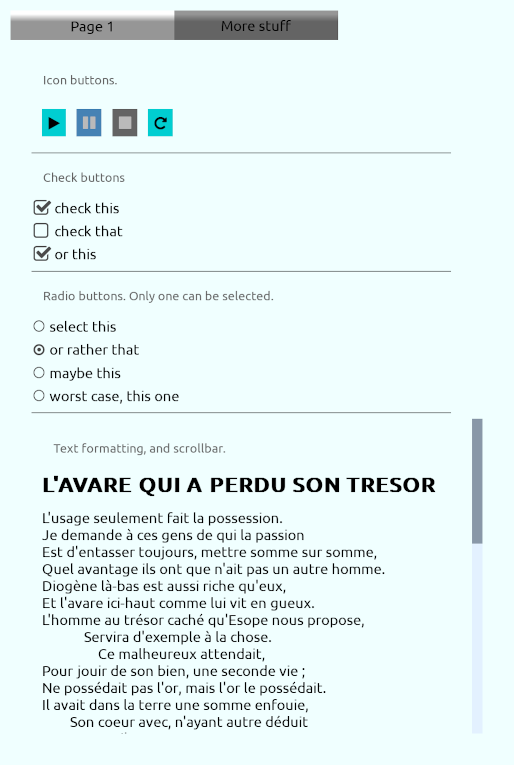
Widgets are the building bricks, reponsible for graphic elements that respond to events (mouse, touchscreen, keyboard, etc.).
For a more functional use, they can be "connected" (by pairs at this moment) instead of reacting with callbacks (see examples).
- check box
- push button (with labels or images)
- rich text display
- image (all usual formats)
- slider (horizontal, vertical, or circular)
- text input
Layouts
widgets can be combined in various ways into layouts. For instance, a check box followed by a text label is a common layout.
Several predefined layouts are available:
- scrollable list (that can easily handle a large number of elements)
- multi-column table
- tabs
- popup
- various menus (menu bar, drop down menus with submenus)
- select list
- radio list
Layouts can be animated (slide-in, transparency, rotation)
Screenshots
Videos
randomize, demo 1907
Installation
Using the opam package
This is the easiest way unless you want to try out the development version.
opam install bogue
That's it.
Bulding from sources
Prerequisites
You need a working ocaml installation with opam, see the ocaml doc. Then, make sure you have dune, tsdl, tsdl-image and tsdl-ttf:
opam install dune tsdl tsdl-image tsdl-ttf
Get the latest source
Download the git archive, unzip it, cd into the bogue-master dir, and then:
dune build
opam install .
Documentation
It's good to first have a look at Bogue's general principles.
A much more complete doc can be found here. It does not cover all available features (yet), but it's already a good start.
Examples
You should first try a minimal example.
The examples directory contains more sophisticated examples. If you installed the bogue package with opam (as described above), these examples are available via the boguex program. For instance, run examples 34 and 41 by:
boguex 34 41
Type boguex -h to have the list of all examples.
A minimal app using Bogue
See here.